

Overview
Once Shopify is connected, the Dema Agent can query products, orders, customers, and inventory from your Shopify store through the Admin GraphQL API. Useful for pulling live commerce data into an analysis and for light write actions such as updating customer records, discounts, and product publications.Prerequisites
- A Shopify store you own, or staff access with permission to manage and install apps.
- Access to the Shopify Dev Dashboard to create the app.
Shopify requires you to create your own app and paste its credentials into Dema. You only need to do this once per store. When the Dev Dashboard asks how to distribute the app, choose Custom distribution — it is for an app installed on a single store you own and is not listed on the App Store.
Connect Shopify
1
Create an app in the Shopify Dev Dashboard
- Open the Shopify Dev Dashboard and go to Apps → Create app.
- Give the app a recognizable name, for example
Dema Agent. - Choose Custom distribution and select the store you want to connect.
2
Add the app URL, redirect URL and scopes in a new version
Shopify app versions are immutable — to set or change the URLs or scopes, you create a new version based on the current one and release it. Changing them later works the same way.
- Open the app and click Create version.
- Under Access → Scopes, enter the scopes listed under Scopes Dema requests below as a comma-separated list.
-
Under Access → Redirect URLs, add
https://app.dema.ai/agents/oauth/callback. - Under URLs → App URL, enter the same value again. Shopify only starts the install when the App URL and the redirect URL are on the same domain, and leaving your own website or Shopify’s placeholder here is the most common reason connecting Shopify fails.
-
Click Release to make the version active.
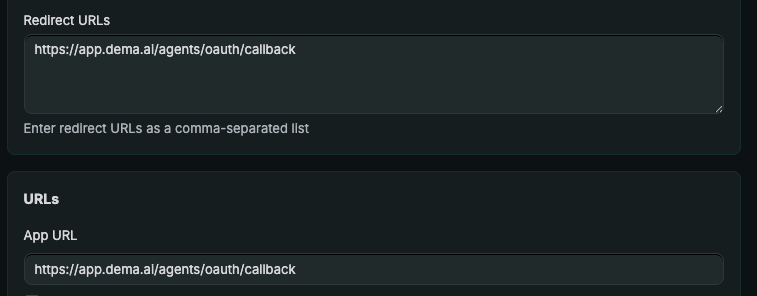
Clicking this app’s tile inside your Shopify admin will now open a Dema page rather than an app home screen. That is expected: the app exists only to authorize Dema’s connection to your store.
3
Copy the app credentials
In the app’s Settings, copy the Client ID and Client secret.
4
Paste the credentials into Dema
In Dema, go to Agents → Settings → Integrations, find Shopify, and click Connect. Enter:
- Client ID from Shopify
- Client secret from Shopify
- Account URL in the form
https://{store}.myshopify.com, replacing{store}with your store’s subdomain
Scopes Dema requests
By default
read_orders returns only the last 60 days of orders. Older orders require the read_all_orders scope, which Shopify must approve separately — it is not requested here.When the connection expires
Dema uses expiring offline tokens. The access token lasts about an hour and Dema refreshes it automatically (the refresh token is valid 90 days and rotates on each refresh). If Dema stays disconnected past the refresh window, or you uninstall the app in Shopify, the connection lapses — reconnect from Agents → Settings → Integrations → Shopify.Troubleshooting
The redirect_uri and application url must have matching hosts. Your app’s App URL is not on the same domain as the redirect URL. Create a new version, set both URLs → App URL and Access → Redirect URLs tohttps://app.dema.ai/agents/oauth/callback, and release it.- Redirect URI mismatch. The redirect URI in your Shopify app must be
https://app.dema.ai/agents/oauth/callbackexactly, including protocol and path. - Dema says the store URL is invalid. The account URL must be HTTPS and must end with
.myshopify.com. Use your store’s real subdomain, not a custom domain. - Install fails on the store. The staff account installing the app needs a role with permission to manage and install apps. Store owners can adjust staff permissions in the store admin under Settings → Users and permissions.