> ## Documentation Index
> Fetch the complete documentation index at: https://docs.dema.ai/llms.txt
> Use this file to discover all available pages before exploring further.
# Model settings
> Learn how to configure MMM optimization targets, budget constraints, and guardrails to align recommendations with your business strategy.
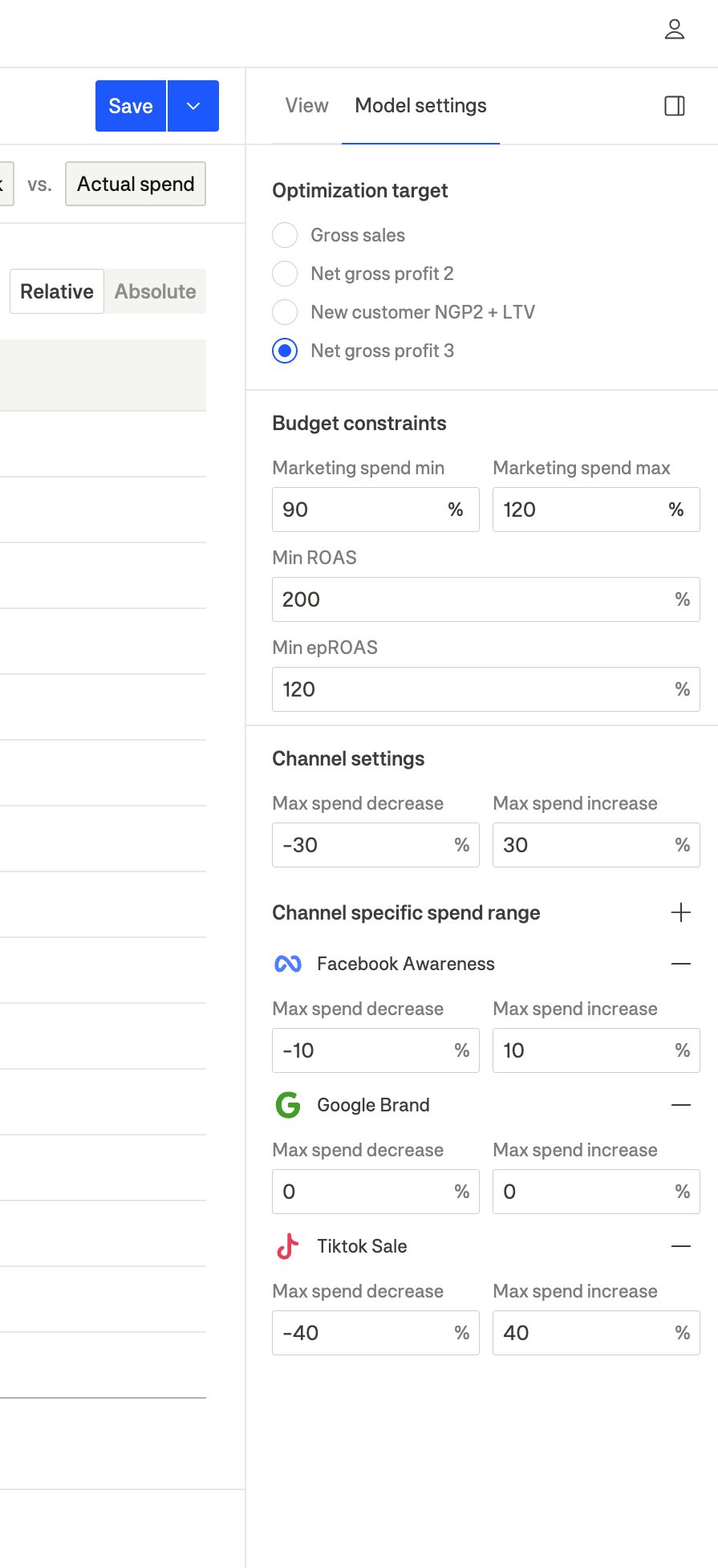
The **Model settings** panel allows you to configure how Dema's MMM optimizes your marketing spend. Access it by clicking the "Model settings" tab in the right sidebar when viewing any MMM configuration.
 ***
## Optimization target
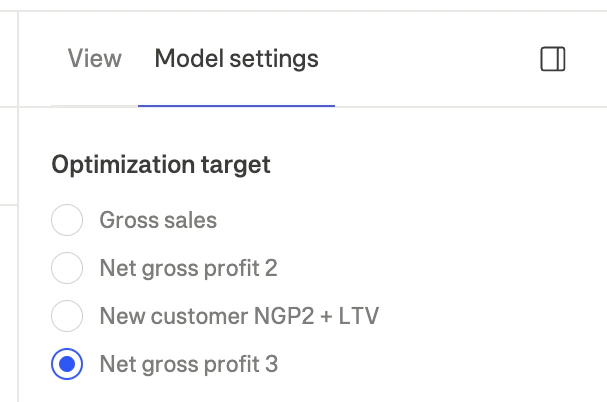
The optimization target determines what metric the model optimizes for when calculating recommended spend allocations.
***
## Optimization target
The optimization target determines what metric the model optimizes for when calculating recommended spend allocations.
 ### Available targets
| Target | Description | Best for |
| --------------------------- | ------------------------------------------------------ | ----------------------------------------------- |
| **Gross sales** | Total revenue without cost deductions | Revenue-focused strategies, market share growth |
| **Net gross profit 2** | Gross sales minus returns, COGS, and fulfillment costs | Balanced profitability optimization |
| **New customer NGP2 + LTV** | New customer value plus lifetime value | Customer acquisition strategies |
| **Net gross profit 3** | NGP2 minus marketing spend | Maximum profitability focus |
Start with **Net gross profit 2** or **Net gross profit 3** if you want to optimize for profitability. Use **Gross sales** when you're focused on growth or market share, even at reduced margins.
### How to change the target
1. Open the **Model settings** tab in the right sidebar
2. Under **Optimization target**, select your desired metric
3. The entire view will update to show recommendations optimized for that target
***
## Budget constraints
Budget constraints set overall limits on the optimization recommendations.
### Available targets
| Target | Description | Best for |
| --------------------------- | ------------------------------------------------------ | ----------------------------------------------- |
| **Gross sales** | Total revenue without cost deductions | Revenue-focused strategies, market share growth |
| **Net gross profit 2** | Gross sales minus returns, COGS, and fulfillment costs | Balanced profitability optimization |
| **New customer NGP2 + LTV** | New customer value plus lifetime value | Customer acquisition strategies |
| **Net gross profit 3** | NGP2 minus marketing spend | Maximum profitability focus |
Start with **Net gross profit 2** or **Net gross profit 3** if you want to optimize for profitability. Use **Gross sales** when you're focused on growth or market share, even at reduced margins.
### How to change the target
1. Open the **Model settings** tab in the right sidebar
2. Under **Optimization target**, select your desired metric
3. The entire view will update to show recommendations optimized for that target
***
## Budget constraints
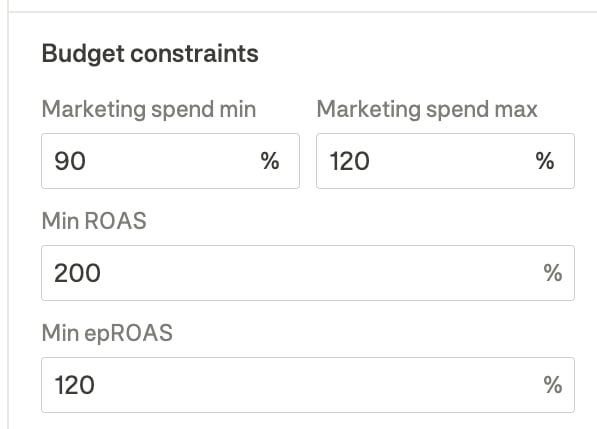
Budget constraints set overall limits on the optimization recommendations.
 ### Marketing spend limits
| Setting | Description |
| ----------------------- | ------------------------------------------------------------------------------------------- |
| **Marketing spend min** | Minimum percentage of actual spend (e.g., 90% means spend won't decrease by more than 10%) |
| **Marketing spend max** | Maximum percentage of actual spend (e.g., 120% means spend won't increase by more than 20%) |
### Performance constraints
| Setting | Description |
| -------------- | ------------------------------------------------------- |
| **Min ROAS** | Minimum return on ad spend threshold (as percentage) |
| **Min epROAS** | Minimum effective profit ROAS threshold (as percentage) |
Setting aggressive return constraints may limit the optimizer's ability to find optimal allocations. Start with moderate thresholds and adjust based on results.
***
## Channel settings (Guardrails)
Guardrails control how much the model can recommend changing spend on each channel. This prevents recommendations that are too aggressive and could disrupt ad platform algorithms.
### Marketing spend limits
| Setting | Description |
| ----------------------- | ------------------------------------------------------------------------------------------- |
| **Marketing spend min** | Minimum percentage of actual spend (e.g., 90% means spend won't decrease by more than 10%) |
| **Marketing spend max** | Maximum percentage of actual spend (e.g., 120% means spend won't increase by more than 20%) |
### Performance constraints
| Setting | Description |
| -------------- | ------------------------------------------------------- |
| **Min ROAS** | Minimum return on ad spend threshold (as percentage) |
| **Min epROAS** | Minimum effective profit ROAS threshold (as percentage) |
Setting aggressive return constraints may limit the optimizer's ability to find optimal allocations. Start with moderate thresholds and adjust based on results.
***
## Channel settings (Guardrails)
Guardrails control how much the model can recommend changing spend on each channel. This prevents recommendations that are too aggressive and could disrupt ad platform algorithms.
 ### Global guardrails
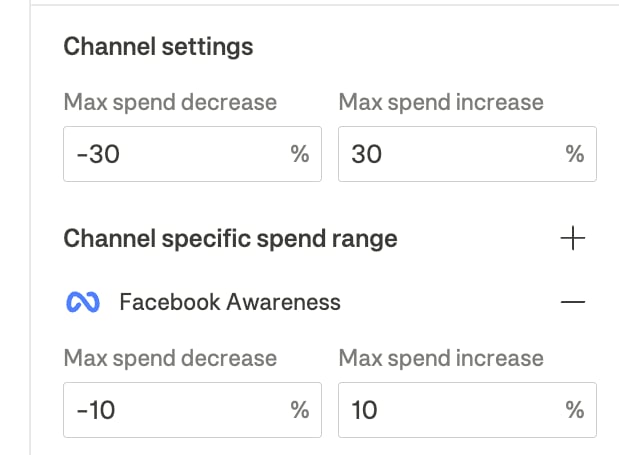
Global guardrails apply to all channels by default:
| Setting | Description | Default |
| ---------------------- | ----------------------------------------------------------- | ------- |
| **Max spend decrease** | Maximum percentage the model can recommend decreasing spend | -30% |
| **Max spend increase** | Maximum percentage the model can recommend increasing spend | +30% |
The ±30% default is designed to prevent shocking ad platform algorithms. Meta and Google recommend gradual budget changes to maintain campaign stability.
### Channel-specific guardrails
You can override the global guardrails for specific channels that need different treatment:
1. Click the **+** button next to "Channel specific spend range"
2. Select the channel you want to customize
3. Set custom **Max spend decrease** and **Max spend increase** values
#### When to use channel-specific guardrails
* **Lock a channel**: Set both decrease and increase to 0% to keep spend unchanged
* **Allow more flexibility**: Increase the range for channels where you're comfortable with larger swings
* **Protect brand campaigns**: Set conservative limits for brand search to maintain visibility
* **Enable scaling**: Allow higher increases for high-performing channels you want to scale
### Example configurations
| Scenario | Setting | Value |
| ----------------------- | ------------- | ------------ |
| **Conservative** | Global | -15% to +15% |
| **Aggressive scaling** | Global | -30% to +30% |
| | Facebook Sale | -10% to +40% |
| | Google Brand | 0% to 0% |
| **Testing new channel** | TikTok Sale | -40% to +40% |
***
## How constraints affect recommendations
The optimizer works within your defined constraints to find the best allocation:
1. **Respects all guardrails**: No channel will have recommendations outside its allowed range
2. **Optimizes within bounds**: The model finds the best allocation possible given the constraints
3. **Reports missed potential**: If constraints prevent reaching optimal allocation, you'll see the potential profit gap
Very tight constraints may prevent the model from finding significant optimizations. If you see large "missed potential" values, consider relaxing some guardrails.
***
## Saving your configuration
Model settings are saved as part of your **MMM configuration**:
### Global guardrails
Global guardrails apply to all channels by default:
| Setting | Description | Default |
| ---------------------- | ----------------------------------------------------------- | ------- |
| **Max spend decrease** | Maximum percentage the model can recommend decreasing spend | -30% |
| **Max spend increase** | Maximum percentage the model can recommend increasing spend | +30% |
The ±30% default is designed to prevent shocking ad platform algorithms. Meta and Google recommend gradual budget changes to maintain campaign stability.
### Channel-specific guardrails
You can override the global guardrails for specific channels that need different treatment:
1. Click the **+** button next to "Channel specific spend range"
2. Select the channel you want to customize
3. Set custom **Max spend decrease** and **Max spend increase** values
#### When to use channel-specific guardrails
* **Lock a channel**: Set both decrease and increase to 0% to keep spend unchanged
* **Allow more flexibility**: Increase the range for channels where you're comfortable with larger swings
* **Protect brand campaigns**: Set conservative limits for brand search to maintain visibility
* **Enable scaling**: Allow higher increases for high-performing channels you want to scale
### Example configurations
| Scenario | Setting | Value |
| ----------------------- | ------------- | ------------ |
| **Conservative** | Global | -15% to +15% |
| **Aggressive scaling** | Global | -30% to +30% |
| | Facebook Sale | -10% to +40% |
| | Google Brand | 0% to 0% |
| **Testing new channel** | TikTok Sale | -40% to +40% |
***
## How constraints affect recommendations
The optimizer works within your defined constraints to find the best allocation:
1. **Respects all guardrails**: No channel will have recommendations outside its allowed range
2. **Optimizes within bounds**: The model finds the best allocation possible given the constraints
3. **Reports missed potential**: If constraints prevent reaching optimal allocation, you'll see the potential profit gap
Very tight constraints may prevent the model from finding significant optimizations. If you see large "missed potential" values, consider relaxing some guardrails.
***
## Saving your configuration
Model settings are saved as part of your **MMM configuration**:
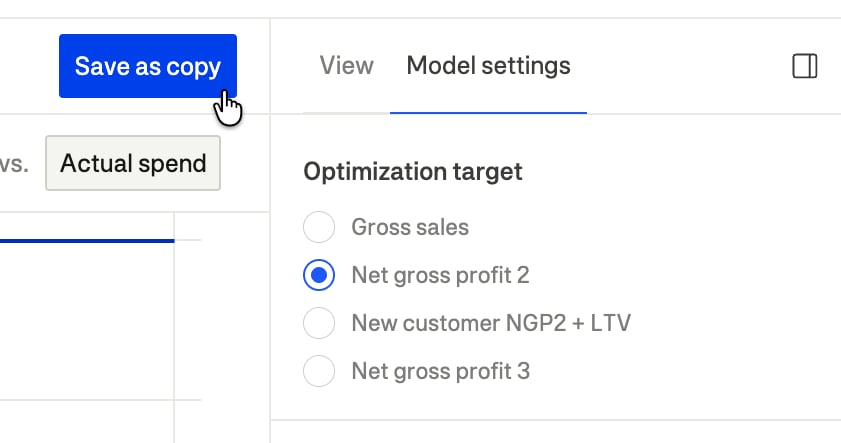 1. Make your desired changes to optimization target, constraints, and guardrails
2. Click the **Save** button to update the current configuration, or **Save as copy** to create a new configuration
3. Your settings will be preserved for future sessions
You can create multiple MMM configurations with different settings to compare different optimization strategies.
***
## Best practices
1. **Start conservative**: Begin with the default ±30% guardrails and tighten only if needed
2. **Match business constraints**: Set return thresholds that reflect your actual profitability requirements
3. **Review certainty indicators**: Channels with "Medium" or "Run test" certainty may need tighter guardrails until more data is available
4. **Iterate gradually**: Make small adjustments to constraints and observe how recommendations change
5. **Use channel-specific limits strategically**: Lock channels only when you have specific business reasons (e.g., contractual minimums, brand protection)
1. Make your desired changes to optimization target, constraints, and guardrails
2. Click the **Save** button to update the current configuration, or **Save as copy** to create a new configuration
3. Your settings will be preserved for future sessions
You can create multiple MMM configurations with different settings to compare different optimization strategies.
***
## Best practices
1. **Start conservative**: Begin with the default ±30% guardrails and tighten only if needed
2. **Match business constraints**: Set return thresholds that reflect your actual profitability requirements
3. **Review certainty indicators**: Channels with "Medium" or "Run test" certainty may need tighter guardrails until more data is available
4. **Iterate gradually**: Make small adjustments to constraints and observe how recommendations change
5. **Use channel-specific limits strategically**: Lock channels only when you have specific business reasons (e.g., contractual minimums, brand protection)