> ## Documentation Index
> Fetch the complete documentation index at: https://docs.dema.ai/llms.txt
> Use this file to discover all available pages before exploring further.
# Planning future budgets
> Learn how to use Dema's MMM to plan upcoming marketing budgets, optimize for profit targets, and test different allocation strategies.
## Why future planning matters
After analyzing your historical performance, the next step is shaping your **upcoming marketing plan**. Dema's MMM enables you to forecast various spend allocations, set constraints and targets, and see projected impacts on profit before committing to changes.
***
## Planning with future date ranges
To plan future budgets, select a forward-looking date range from the date picker:
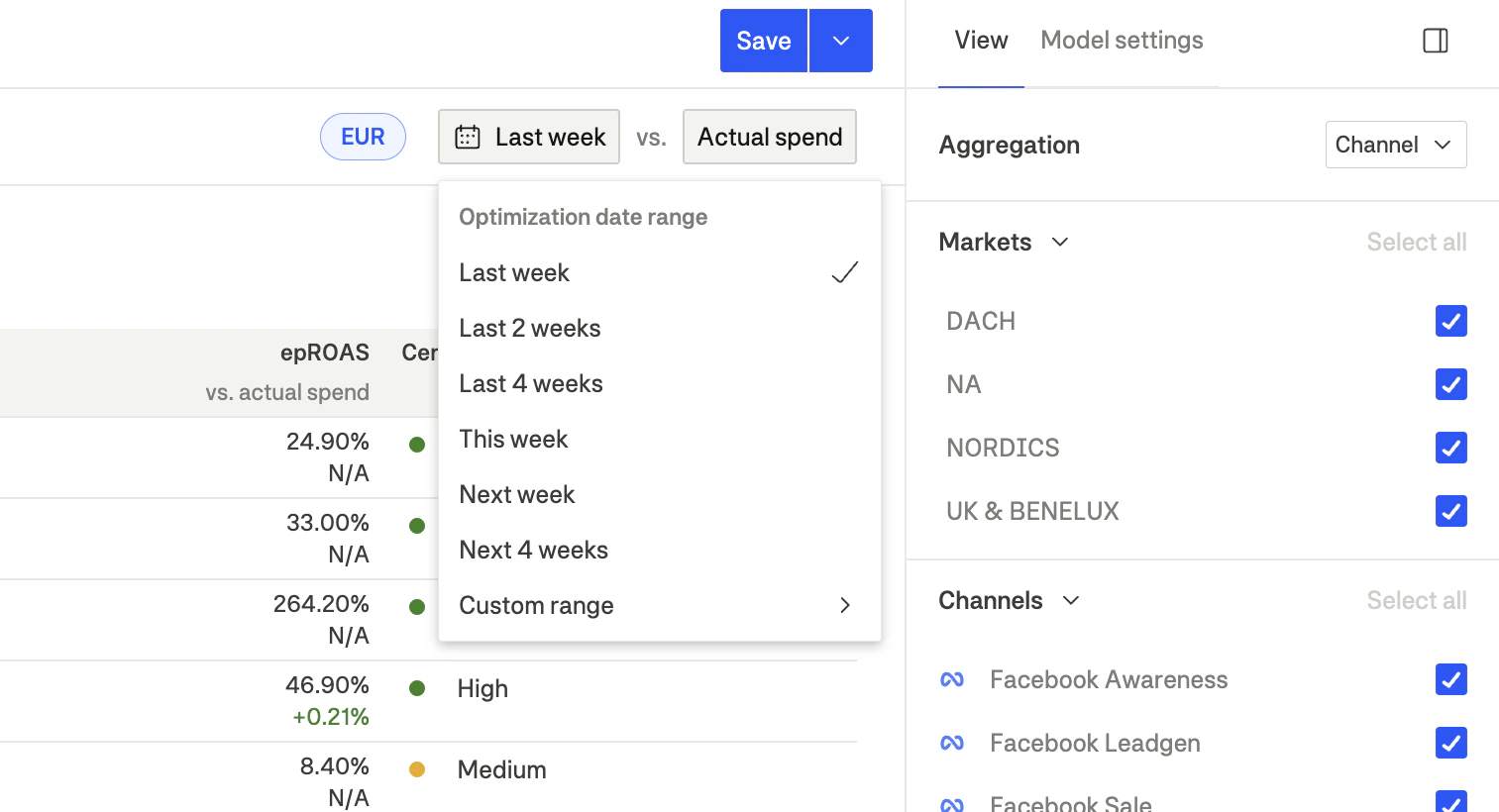 | Option | Description |
| ---------------- | ------------------------------------- |
| **Next week** | Recommendations for the upcoming week |
| **Next 4 weeks** | Recommendations for the next month |
| **Custom range** | Select specific future dates |
When viewing future periods, the model:
* Incorporates predicted **seasonality** and trends
* Uses the most recent **saturation curve parameters**
* Applies your configured **guardrails and constraints**
* Shows **forecasted recommendations** rather than historical analysis
***
## Configuring optimization settings
Before viewing future recommendations, configure your optimization settings in the **Model settings** panel:
| Option | Description |
| ---------------- | ------------------------------------- |
| **Next week** | Recommendations for the upcoming week |
| **Next 4 weeks** | Recommendations for the next month |
| **Custom range** | Select specific future dates |
When viewing future periods, the model:
* Incorporates predicted **seasonality** and trends
* Uses the most recent **saturation curve parameters**
* Applies your configured **guardrails and constraints**
* Shows **forecasted recommendations** rather than historical analysis
***
## Configuring optimization settings
Before viewing future recommendations, configure your optimization settings in the **Model settings** panel:
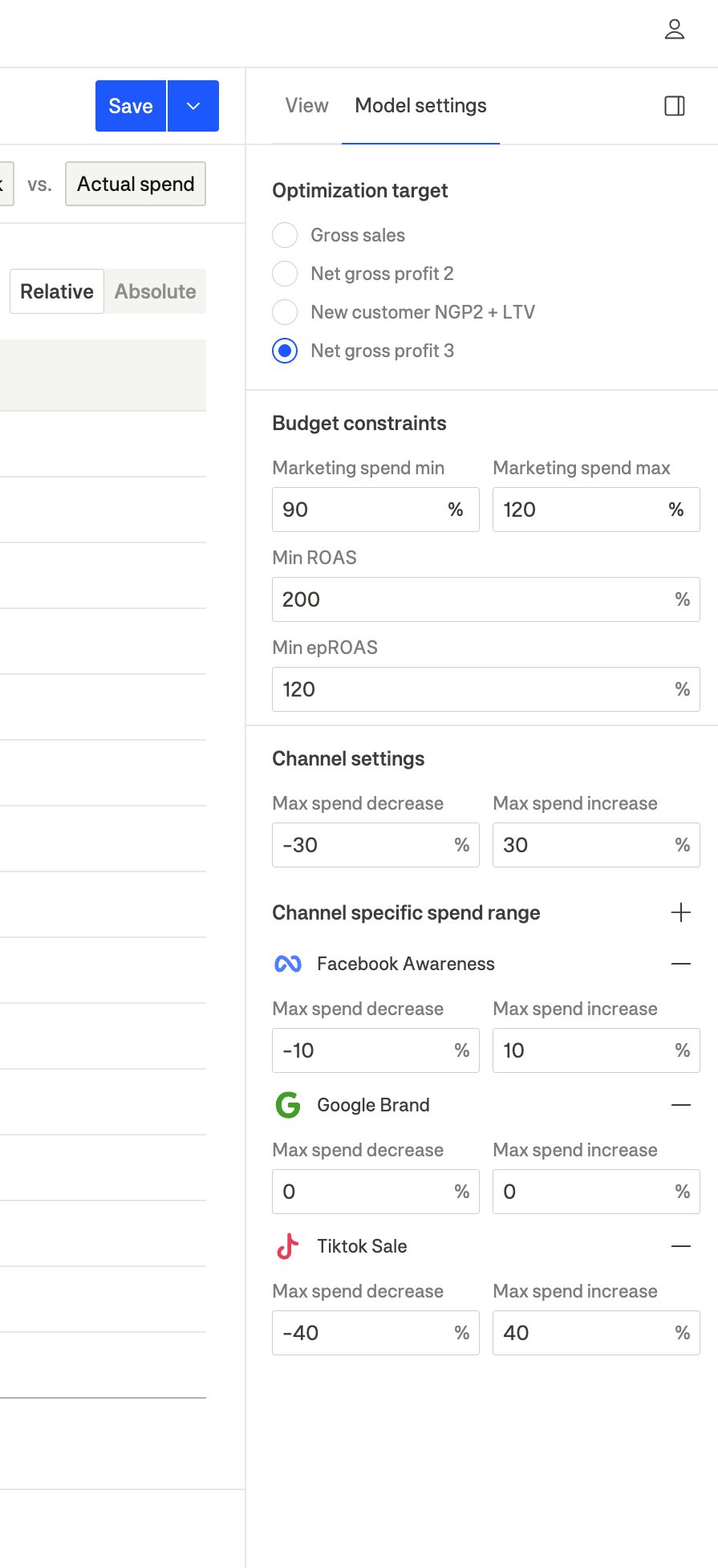 ### 1. Select your optimization target
Choose what metric to optimize for:
| Target | Best for |
| --------------------------- | ---------------------------- |
| **Gross sales** | Revenue growth, market share |
| **Net gross profit 2** | Balanced profitability |
| **Net gross profit 3** | Maximum profit focus |
| **New customer NGP2 + LTV** | Customer acquisition value |
### 2. Set budget constraints
Define your overall budget parameters:
* **Marketing spend min/max**: Set acceptable range as percentage of current spend
* **Min ROAS**: Ensure minimum return threshold is met
* **Min epROAS**: Ensure minimum profit return threshold is met
### 3. Configure guardrails
Set limits on how much spend can change:
* **Global guardrails**: Default max decrease/increase for all channels (e.g., ±30%)
* **Channel-specific guardrails**: Override limits for specific channels that need different treatment
See the [Model settings](/guides/mmm/model-settings) guide for detailed information on configuring optimization parameters.
***
## Interpreting future recommendations
When viewing a future date range, the interface shows:
### Overview tab
* **Metric cards**: Projected optimized vs. baseline performance
* **Opportunities**: Markets and channels with highest forecasted potential
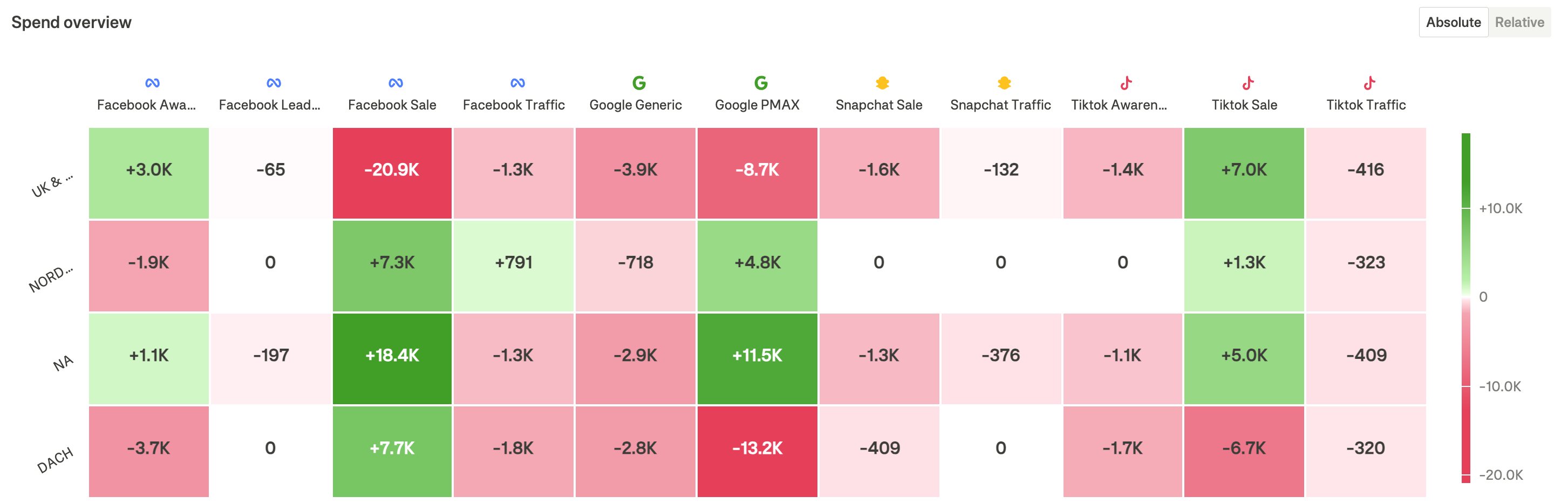
* **Spend matrix**: Recommended allocation changes across markets and channels
### 1. Select your optimization target
Choose what metric to optimize for:
| Target | Best for |
| --------------------------- | ---------------------------- |
| **Gross sales** | Revenue growth, market share |
| **Net gross profit 2** | Balanced profitability |
| **Net gross profit 3** | Maximum profit focus |
| **New customer NGP2 + LTV** | Customer acquisition value |
### 2. Set budget constraints
Define your overall budget parameters:
* **Marketing spend min/max**: Set acceptable range as percentage of current spend
* **Min ROAS**: Ensure minimum return threshold is met
* **Min epROAS**: Ensure minimum profit return threshold is met
### 3. Configure guardrails
Set limits on how much spend can change:
* **Global guardrails**: Default max decrease/increase for all channels (e.g., ±30%)
* **Channel-specific guardrails**: Override limits for specific channels that need different treatment
See the [Model settings](/guides/mmm/model-settings) guide for detailed information on configuring optimization parameters.
***
## Interpreting future recommendations
When viewing a future date range, the interface shows:
### Overview tab
* **Metric cards**: Projected optimized vs. baseline performance
* **Opportunities**: Markets and channels with highest forecasted potential
* **Spend matrix**: Recommended allocation changes across markets and channels
 ### Details tab
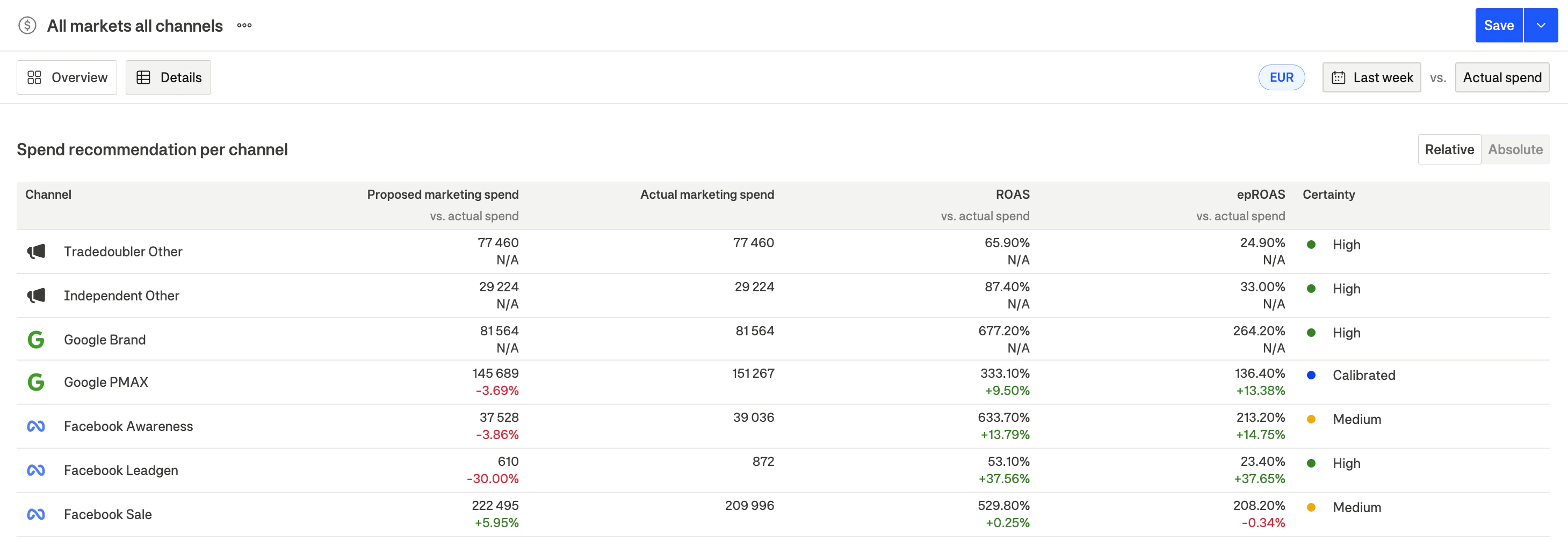
* **Spend recommendation table**: Specific recommendations per channel
* **Saturation curves**: Projected optimal points based on forecasted parameters
* **Contribution forecasts**: Expected contribution from each channel
### Details tab
* **Spend recommendation table**: Specific recommendations per channel
* **Saturation curves**: Projected optimal points based on forecasted parameters
* **Contribution forecasts**: Expected contribution from each channel
 ***
## Working with constraints
### Budget-constrained planning
If you need to work within a specific budget:
1. Set **Marketing spend max** to your target (e.g., 100% to maintain current spend)
2. The model will optimize allocation within that constraint
3. View the "missed potential" to understand what additional budget could achieve
### Performance-constrained planning
If you need to maintain specific returns:
1. Set **Min ROAS** or **Min epROAS** to your threshold
2. The model will only recommend allocations that meet these targets
3. Some channels may receive zero spend if they can't meet the threshold
### Channel-specific constraints
Use channel-specific guardrails for:
* **Locked channels**: Set 0% increase/decrease to maintain current spend
* **Testing channels**: Allow higher increase limits for channels you want to scale
* **Protected channels**: Set lower limits for brand campaigns you want to maintain
***
## Scenario comparison
Compare different future scenarios by:
1. **Create multiple configurations**: Set up different MMM configurations with different constraints
2. **View the same date range**: Compare recommendations across configurations
3. **Analyze trade-offs**: Understand how different constraints affect projected outcomes
### Example scenarios
| Scenario | Marketing spend max | Global guardrails | Min return |
| ---------------------- | ------------------- | ----------------- | ---------- |
| **Conservative** | 100% | ±15% | 150% |
| **Growth focused** | 130% | ±40% | 200% |
| **Efficiency focused** | 80% | ±30% | 200% |
***
## From plan to execution
### Step 1: Review recommendations
1. Check the **spend recommendation table** for specific changes
2. Verify **certainty indicators** are acceptable
3. Review **saturation curves** to understand the rationale
### Step 2: Validate with constraints
1. Ensure recommendations respect your business constraints
2. Check that total spend aligns with your budget
3. Verify return projections meet your targets
### Step 3: Implement gradually
1. Don't make all changes at once if they're large
2. Use the guardrails as a guide for maximum weekly changes
3. Monitor early signals in ad platforms (CPC, CTR, conversion rates)
### Step 4: Track and iterate
1. Compare actual results to forecasted performance
2. Adjust constraints if recommendations consistently miss the mark
3. Re-run future analysis weekly to incorporate new data
***
## Best practices
### Start with realistic constraints
* Keep ±30% default guardrails if you're new to optimization
* Tighten constraints gradually as you gain confidence
* Allow wider ranges for testing and scaling opportunities
### Account for seasonality
* Future recommendations incorporate predicted seasonality
* Compare to same period last year for context
* Be cautious about extreme recommendations during peak periods
### Consider adstock timing
* Changes in slow-adstock channels take weeks to show full impact
* Don't expect immediate results from awareness channel adjustments
* Give sufficient time before evaluating performance
### Balance certainty and opportunity
* Prioritize high-certainty channels for large changes
* Consider running incrementality tests for uncertain channels
* Use smaller changes for channels marked "Run test"
### Iterate weekly
* Dema's MMM updates with new data every week
* Re-run future planning to incorporate latest performance
* Adjust course based on actual vs. forecasted results
Create a weekly rhythm: Review last week's performance on Monday, plan next week's budget on Tuesday, implement changes Wednesday, and monitor signals throughout the week.
***
## Working with constraints
### Budget-constrained planning
If you need to work within a specific budget:
1. Set **Marketing spend max** to your target (e.g., 100% to maintain current spend)
2. The model will optimize allocation within that constraint
3. View the "missed potential" to understand what additional budget could achieve
### Performance-constrained planning
If you need to maintain specific returns:
1. Set **Min ROAS** or **Min epROAS** to your threshold
2. The model will only recommend allocations that meet these targets
3. Some channels may receive zero spend if they can't meet the threshold
### Channel-specific constraints
Use channel-specific guardrails for:
* **Locked channels**: Set 0% increase/decrease to maintain current spend
* **Testing channels**: Allow higher increase limits for channels you want to scale
* **Protected channels**: Set lower limits for brand campaigns you want to maintain
***
## Scenario comparison
Compare different future scenarios by:
1. **Create multiple configurations**: Set up different MMM configurations with different constraints
2. **View the same date range**: Compare recommendations across configurations
3. **Analyze trade-offs**: Understand how different constraints affect projected outcomes
### Example scenarios
| Scenario | Marketing spend max | Global guardrails | Min return |
| ---------------------- | ------------------- | ----------------- | ---------- |
| **Conservative** | 100% | ±15% | 150% |
| **Growth focused** | 130% | ±40% | 200% |
| **Efficiency focused** | 80% | ±30% | 200% |
***
## From plan to execution
### Step 1: Review recommendations
1. Check the **spend recommendation table** for specific changes
2. Verify **certainty indicators** are acceptable
3. Review **saturation curves** to understand the rationale
### Step 2: Validate with constraints
1. Ensure recommendations respect your business constraints
2. Check that total spend aligns with your budget
3. Verify return projections meet your targets
### Step 3: Implement gradually
1. Don't make all changes at once if they're large
2. Use the guardrails as a guide for maximum weekly changes
3. Monitor early signals in ad platforms (CPC, CTR, conversion rates)
### Step 4: Track and iterate
1. Compare actual results to forecasted performance
2. Adjust constraints if recommendations consistently miss the mark
3. Re-run future analysis weekly to incorporate new data
***
## Best practices
### Start with realistic constraints
* Keep ±30% default guardrails if you're new to optimization
* Tighten constraints gradually as you gain confidence
* Allow wider ranges for testing and scaling opportunities
### Account for seasonality
* Future recommendations incorporate predicted seasonality
* Compare to same period last year for context
* Be cautious about extreme recommendations during peak periods
### Consider adstock timing
* Changes in slow-adstock channels take weeks to show full impact
* Don't expect immediate results from awareness channel adjustments
* Give sufficient time before evaluating performance
### Balance certainty and opportunity
* Prioritize high-certainty channels for large changes
* Consider running incrementality tests for uncertain channels
* Use smaller changes for channels marked "Run test"
### Iterate weekly
* Dema's MMM updates with new data every week
* Re-run future planning to incorporate latest performance
* Adjust course based on actual vs. forecasted results
Create a weekly rhythm: Review last week's performance on Monday, plan next week's budget on Tuesday, implement changes Wednesday, and monitor signals throughout the week.